Importing and Exporting Books
You can import and export your library to back up your data or move it between tools.
Exporting Your Library
You can back up your library or move your data to other platforms by exporting it in various formats.
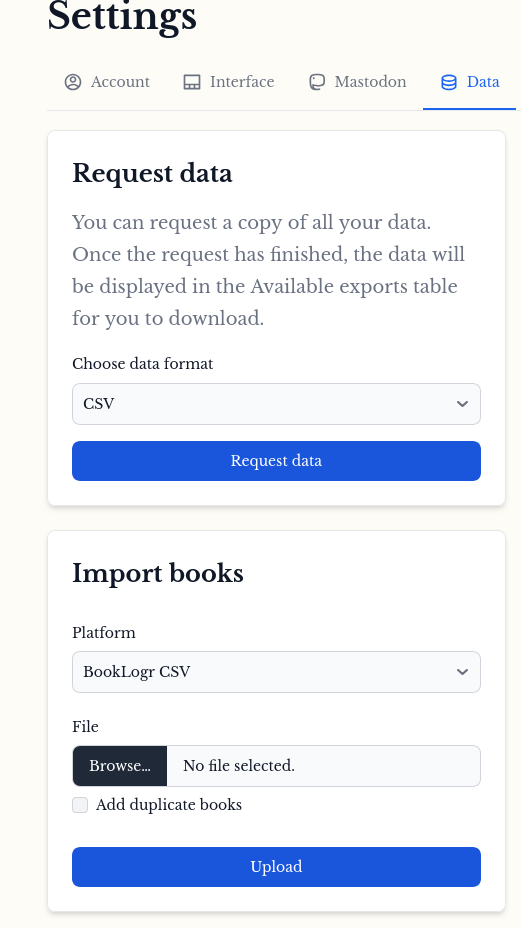
- Navigate to Settings and select the Data tab.
- Under the Request data section, use the dropdown menu to choose your preferred file format: CSV, HTML, or JSON.
- Click the Request data button to generate and download your file.
Importing Books
You can populate your BookLogr library in bulk by importing existing data.
- Navigate to Settings and select the Data tab.
- In the Import books section, choose the appropriate platform from the dropdown menu:
- BookLogr CSV: For re-importing data previously exported from BookLogr.
- Goodreads CSV: For migrating your library from Goodreads.
- Click Browse to select the file from your computer.
- Optionally, check Add duplicate books if you wish to import entries that may already exist in your library.
- Click Upload to process the file and add the books to your collection.
BookLogr CSV Format
If you are creating a file manually or building a third-party tool to interact with BookLogr, your CSV must adhere to the following structure. All columns must be present, even if they are empty.
CSV Specification
| Column | Type | Description |
|---|---|---|
title | String | The full title of the book. |
isbn | String | The 10 or 13-digit ISBN. |
description | String | A summary or synopsis of the book. |
reading_status | String | One of: Read, Currently reading, To be read, Did not finish. |
current_page | Integer | The number of pages read so far. |
total_pages | Integer | The total page count of the book. |
author | String | The full name of the author. |
rating | Integer | A numeric rating (leave empty if not applicable). |
notes | JSON Array | An array of notes or quotes, e.g., []. |
Example File
title,isbn,description,reading_status,current_page,total_pages,author,rating,notes
Northern Lights,9780702311413,"Description text here",Read,199,199,Philip Puleman,,[]
Harry Potter and the Half-Blood Prince,0786277459,"Description text here",Currently reading,38,831,J. K. Rowling,,[]
note
Ensure your CSV uses standard comma separation and that fields containing commas or newlines are properly enclosed in double quotes (e.g., the description field).